Time Limitation and Historization
In HR-Expert, an employee's entries can be saved in a historized manner in a timeline. However, a few basic things must be observed so that no records are accidentally overwritten. HR-Expert offers the administrator a good deal of automatic support, but does not always question the correctness of the data entered. The principle applies: "The administrator is (almost) always right."
Rule no. 1:
It is recommended to always create a new record by clicking "New" rather than editing an existing one.
- "Edit" changes the data of an existing record
- "New" creates a new record.
Rule no. 2:
The "Valid from" and "Valid until" dates are decisive for the storage of a record such as group assignment, salary entries, bank accounts, primary home address, employment entries, etc.
If HR-Expert has to make a delineation because of a time overlap (conflict), the most recently entered record is always given preference. For better understanding, the following graphic describes the priority principle.
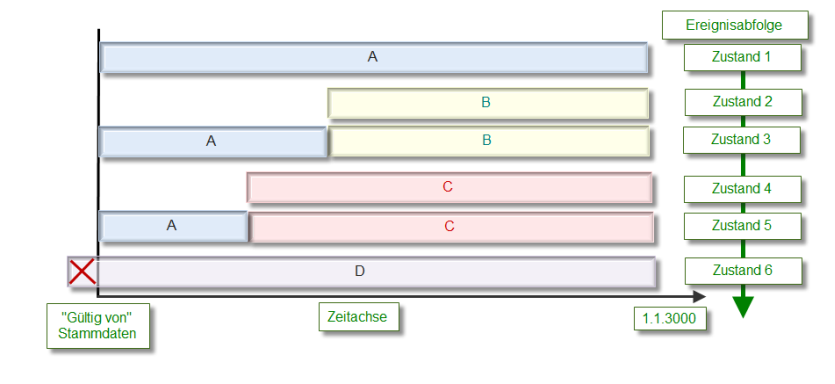
This graphic shows how entries with different validity periods relate to one another.
Important! Absolutely nothing can be saved before the start of validity of the employee record, defined in the "Valid from" date on the Master data tab. Every entry with an earlier start of validity is automatically corrected to this date (entry D in the graphic).
State 1: Entry A begins, e.g., with the "Valid from" of the master data.
State 2: The HR admin creates B with a "Valid from" during the validity period of A. A and B both have a "Valid until" of infinity.
When saving, the system now automatically resolves the time overlaps of the two records. According to the principle of giving priority to newer records, the original entry A is thus shortened in time so that it ends at the beginning of B.
State 3: Shows the result after the automatic correction by the system.
State 4: The HR admin creates C with a validity before that of B. B and C both have a "Valid until" of infinity.
Again there are time overlaps, which are not permitted and are automatically resolved by the system when saving according to the principle of giving priority to newer records.
State 5: Shows the result after saving. The system has corrected the "Valid until" of A to one day before the "Valid from" of C. Entry C is valid until further notice ("Valid until" infinity).
State 6: The HR admin creates entry D with a date before the validity date of the employee master record.
In addition to the time overlap with all previous entries, this also results in the error situation that the validity begins before the validity of the employee. The system corrects the situation when saving as follows:
- The start of validity of the new entry is set to the start of validity of the employee.
- The new entry overwrites (deletes) all previously created entries, since these "collide" in time with the newer one.
The result is a single entry D, which extends over the entire validity period and erases all previous entries.
Summary
- The "Valid from" date in the employee's master data is the earliest possible start of validity of all records it contains.
- "Edit" changes an existing record! The previous contents are not saved!
- "New" creates a record, ideal for the historized storage of data.
- The most recently entered data takes priority. "The administrator is right," so particular attention must be paid to entering the "Valid from" and "Valid until" data correctly.
- At any point in time, only one entry can exist per historized entry type (e.g., only one primary home address per validity period).