Time Bookings
The booking mask allows the user to perform time bookings online.
The date and time are taken from the web server and the correct booking rhythm is determined by the system. In addition, absence reasons can also be booked this way (e.g., official errand, doctor's appointment, etc.).
Depending on the configuration, the time taken over can be adjusted within predefined limits (maximum number of minutes earlier or later).
Furthermore, a message field can be configured in which the employee can enter message texts. Example: Official errand - customer visit; Present - in meeting/conference, etc.
This message is then visible in the attendance list and can thus be seen by colleagues.
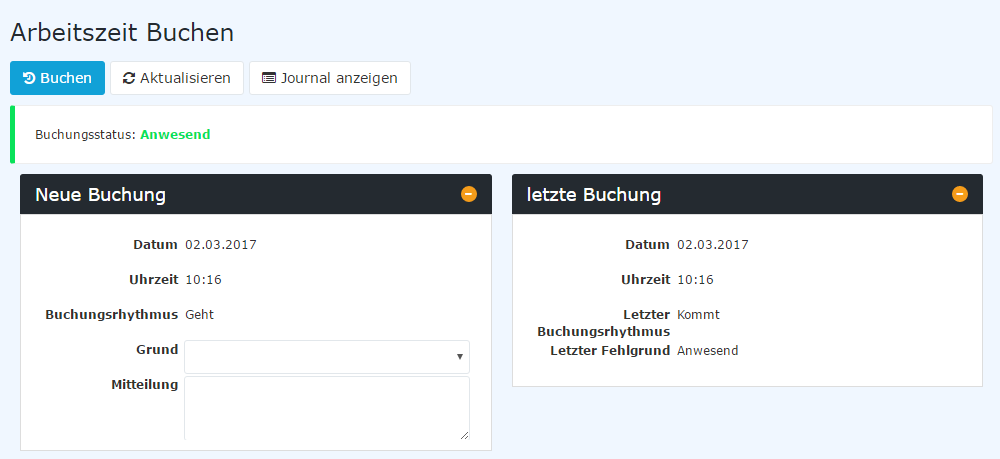
The upper area of the mask shows the current booking status, and optionally the current working time. In the "New booking" area, the date, time, booking rhythm and the absence reasons are offered; depending on the configuration, the absence reasons can be displayed as a selection list or as separate buttons. Next to it, either the "last booking" or a table of "Today's bookings" (optionally with location) can be displayed. The "Refresh" button reloads the mask.
If location detection is activated, the GPS coordinates of the device are additionally transmitted with the booking.
If the current day is before the start or after the end of the employee's time recording, booking is not possible: the buttons are deactivated and a corresponding notice is displayed.
The "Show journal" button can be used to get an overview of the entire monthly journal.
To hide the journal again, click the button "Hide journal". It appears automatically after clicking the "Show journal" button.
A successful booking is acknowledged by the server with a message. If errors occur, corresponding error messages appear.

In addition, the "Booking" widget is available on the dashboard. It shows the current status and the current working time and allows booking directly via buttons for the individual booking reasons.