Permission types
Authorization control allows the targeted allocation of various access permissions, for example to certain forms, information functions, evaluation lists, etc. For example, it is possible to control that certain forms can only be accessed by certain employees or certain groups, or that an action such as booking or calendar is accessible to all employees.
The following permission types can be found in the action permissions:
| Client permission | Group permission |
| Personal permission | Role permission |
Permissions are assigned either via the respective action, in the person master data sheet or via the role.
Client permission
Client permission enables the execution of various actions for all employees of the client. This is particularly useful for actions such as booking, monthly journal, personal settings or changing passwords.
Group permission
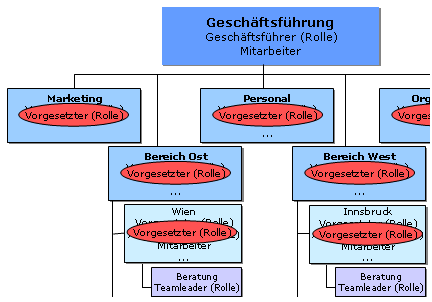
Group permission enables the execution of various actions for a specific group (department). The following example shows a group permission for the "Bereich Ost" group (marked in red).

It is also possible to extend the group permission to the subordinate groups. This gives the subgroups the same access permission as the parent group. In our example, the groups "Vienna" and "Consultancy" are therefore also highlighted in red, as these are subgroups of the group "Area East".

Personal permission
The personal permission makes it possible to grant specific persons execution permission for certain actions.

Role permission
The role permission allows the execution of various actions only for certain role holders (team leader, supervisor, ...). This permission enables role holders to view management lists, for example. All role holders of the selected role in the organization therefore receive the role permission and view permission (in accordance with the role competence defined in the role itself > competence target All, person or group).
Processing logic for permissions
If a permission is given, the action or configuration for which the permission exists can be accessed. If the parent action is assigned in the menu tree instead of the action configuration and the current user only has explicit permission for a derived action configuration, they will still be forwarded to the appropriate action configuration.
If an action is implemented with several configurations in the menu tree (e.g. several variants of the monthly journal that are intended for different employee groups), the calculation of access or their configurations is carried out in a specific order.
Sequence of permission processing
The system first checks whether the permission is assigned to a person; if not, it searches for a group permission. If there is no group permission, the system searches for a role permission, then for the client permission and finally whether the action is generally available. This means that the personal permission is the most specific and therefore the strongest permission, while the general permission is the most general and therefore also the weakest permission.